On the Road with Marauder v8
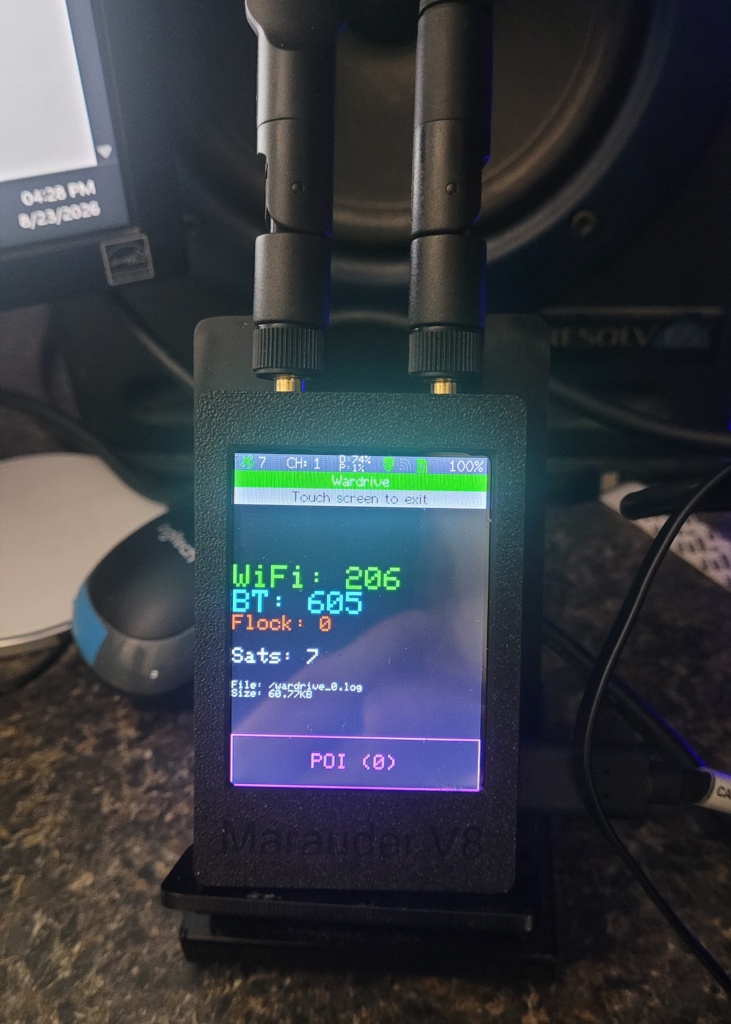
Marauder v8 WiFi / BLE Scanner / Analyzer
Actually, there was no driving. These results were obtained here, on my test bench, after running the scanner for approximately 30 minutes.
Nearby Devices
It was somewhat interesting to see there were 605 BLE devices within range of the Marauder v8 receiver. These signals were received using the stock antennas, nothing fancy, sitting here on the bench and scanning.
There’s quite a variety of devices, everything from the neighbors cars, to their thermostats, kitchen appliances, attic fans, robot vacuum cleaners, routers, TV sets, you name it. It’s a lot of “useless information” unless you’re a nuisance or a knucklehead, you can really do nothing more than map them, any other type of interaction with devices that you don’t own or don’t have permission to access, is illegal.
White Hats Only
These tools are legitimate testing devices intended to be used legally in a test environment, that you either own, or have permission to access. In security penetration testing, the authentication process comes under intense scrutiny for any type of vulnerability in the authentication process. Authentication takes place when a user or device “logs in” to another device via WiFi. The login credentials are transmitted between devices on publicly known WiFi frequencies that anyone with the proper radio equipment could intercept. It’s important to understand the authentication process in order to prevent any unauthorized connections.
Checksums
While most, if not all, wireless network data is encrypted for security and privacy, the encryption methods themselves are public information, as are many of the software programs used to decrypt them. Computer files of every type all have what’s known as a checksum. The checksum is used to verify the integrity of a file. Checksums are unique for all files and can indicate if a file has been altered in any way. The checksum is calculated by using the values assigned to each character in the file, and a checksum is then derived using a standardized algorithm. MD5 is a very common and widely used checksum type (algorithm) that will take the sum of all the characters in the file and produce a 32 character checksum.
An MD5 checksum is represented as a 32-character hexadecimal string, which corresponds to a fixed output size of 128 bits. No matter the size of the file being encrypted, the MD5 checksum will always be 32 characters long.
Understanding the structure of an MD5 checksum is essential.
- Output Size — The MD5 hash produces a fixed output of 128 bits, which is equivalent to 32 hexadecimal characters.
- Hexadecimal Representation — Each character in the MD5 checksum represents four bits, leading to the total of 32 characters for the 128-bit output.
- Deterministic Nature — The same input will always yield the same MD5 checksum, ensuring consistency in data verification.
- Usage — While MD5 checksums can verify data integrity, they are not secure for cryptographic purposes due to vulnerabilities.
Wireless Encryption Types
Wireless encryption types primarily include WEP, WPA, WPA2, and WPA3, each offering varying levels of security and encryption methods. WEP is outdated and insecure, while WPA2 is widely used, and WPA3 provides enhanced security features for modern networks.
Overview of Wireless Encryption Types
Understanding the different wireless encryption types is crucial for network security.
- WEP — Wired Equivalent Privacy is the oldest standard, now considered insecure due to vulnerabilities that allow easy cracking.
- WPA — Wi-Fi Protected Access improved upon WEP by introducing TKIP encryption, but it is still less secure than newer standards.
- WPA2 — This standard uses AES encryption, providing a significant security upgrade and is commonly used today.
- WPA3 — The latest standard, WPA3, offers stronger encryption and better protection against brute-force attacks, making it ideal for modern networks.
Given what we know…
- Frequency the data is transmitted on
- Encryption Type used
- Owner of the data (Personal Login)
- Credentials Handshake
- Encrypted Password
It is not very difficult to put these bits of the puzzle together to reveal the user name and password used to gain access to these networks and devices. The key part is what’s referred to as the “handshake”. This is where the login credentials are exchanged to authenticate the connection. This takes place when the connection is first established. You might say, that’s all well and good if you just happen to be listening on the right frequency, at the right time (split second) the authentication handshake takes place. Who’s got the time or patience to monitor a connection for a handshake that takes place in a split second? “That’s nearly impossible” one might think. People stay logged in automatically these days. The odds of catching an authentication handshake must be astronomical. They are….but…
De-Authorization: At the time and place of our choosing…
Test equipment like the Marauder v8 have a function called DeAuth, which essentially sends a broadcast message telling all devices that receive the command (and support it), to de-authenticate all currently connected device logins. That’s right boys and girls, we can force all these nearby devices to be disconnected with the press of a button. No big deal to the user, because his device will log him back in automatically. Right? …yes, but this time, we are ready to capture and analyze the handshake. Actually, all the handshakes of all the devices that we just disconnected. That means every device that was connected on the WiFi channel where we issued the DeAuth command will now need to reauthenticate. Yes, it’s very sneaky, and it’s very illegal. Don’t do it. Don’t ask me how, I won’t tell you anyway, unless you’re wearing the same color hat I am…