Here’s a quick look at how the “Free Craigslist HP Server” has been rolled out. I configured everything with the help of ChatGPT AI. I wouldn’t have gotten this far, this fast, if it wasn’t for the AI showing me what to do. I find I can work much faster when engaging the AI. I am basically just typing in the error messages that come up along the way, and continue until there are no more errors. As best I can tell, I have it optimally configured for the current hardware.
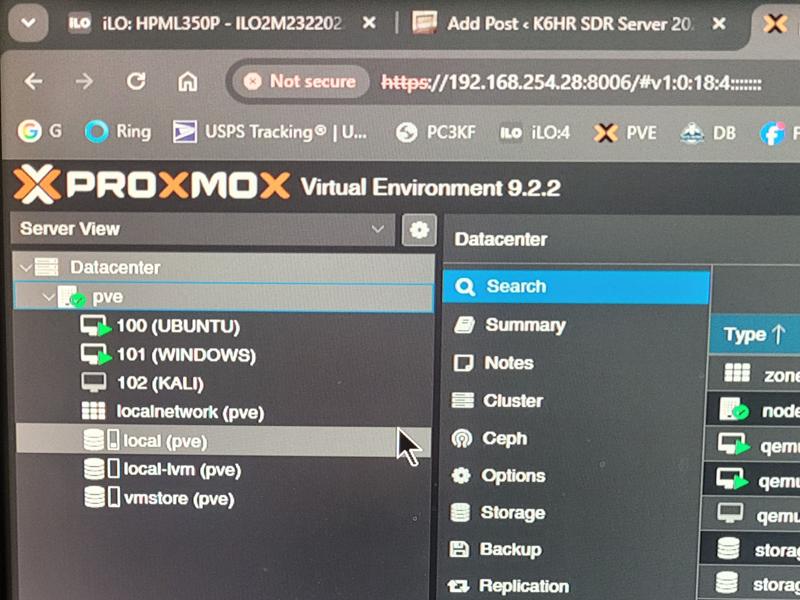
Proxmox Virtual Environment v9.2
Proxmox provides multiple “Virtual Environments” that are ‘computers within a computer’ aka “Virtual Machines” capable of running entirely independent of one another, simultaneously.
Can you imagine having Windows 11 Pro, Ubuntu Linux, Kali Linux, and MacOS all available to you at the same time, on any device that has a web browser? I had to find out for myself just how smoothly these operating systems would run, considering they all share the same ‘virtual hardware’ and resources. The results may surprise you. And, to top it off, it’s as if the HP Proliant Enterprise Hardware was made for just this type of implementation.
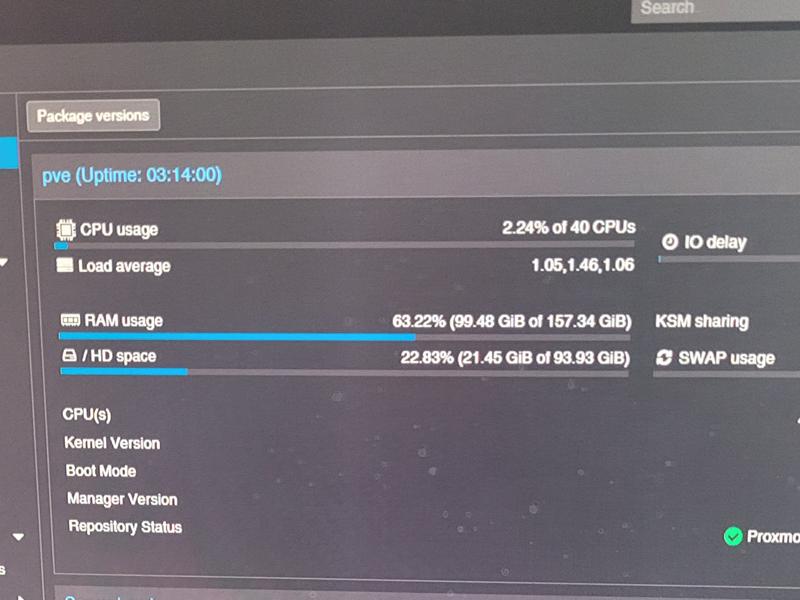
Respectable performance stats with all three Operating systems up and running. I like the CPU usage number. Amazing! 2.24% of 40 CPU’s used. I hope it stands up strong as I begin adding and creating heavy workloads. In addition to multiple O/S platforms, I’m planning on building multiple web servers, a media streaming server, Installing MacOS, and looking forward to harnessing some of these resources in my forensic and penetration testing studies.
Here is the ChatGPT summary of the project so far…
Current Hardware
- Server: HPE ProLiant ML350p Gen8
- CPUs: 2 × Intel Xeon E5-2690 v2
- 20 physical cores
- 40 threads (Hyper-Threading)
- 3.0 GHz base, up to 3.6 GHz turbo per CPU
- RAM: 160 GB DDR3 ECC Registered
- GPUs: 2 × NVIDIA Tesla K40c
- 24 GB total VRAM
- 5,760 CUDA cores combined
- Storage:
- 6 TB RAID50 VM datastore
- 4.5 TB backup disk
- 2 × 1 TB SSD RAID1 for Proxmox OS
What It Is Good At
Virtualization
Your hardware is excellent for:
- Proxmox
- Windows 11 VM
- Kali Linux VM
- Ubuntu AI VM
- Docker containers
- Home lab services
You can comfortably run:
- 10–20 light VMs
- 5–10 medium VMs
- Multiple containers simultaneously
The 160 GB RAM is the strongest part of the system.
AI / LLM Workloads
The weak point is the K40c generation.
Each K40c:
- 12 GB VRAM
- Compute Capability 3.5
- Released in 2013
Many modern AI frameworks no longer officially support Kepler GPUs.
Practical uses:
- Stable Diffusion (older versions)
- PyTorch builds with older CUDA
- Ollama via CPU
- Text-generation-webui with older models
- Machine learning experimentation
Not practical:
- Large modern 70B models
- Current CUDA 12.x workloads
- Latest TensorRT stacks
- Modern Llama deployments requiring newer architectures
Current Compute Power
Compared with modern hardware:
| Hardware | Relative AI Speed |
|---|---|
| Dual Tesla K40c | 1× |
| RTX 3060 12GB | ~3–5× faster |
| RTX 4070 | ~10× faster |
| RTX 5090 | 30×+ faster |
Ideal Proxmox Layout
Based on your configuration:
| Storage | Purpose |
|---|---|
| SSD RAID1 | Proxmox OS |
| SSD local-lvm | Active VM disks |
| 6TB RAID50 | Large VM storage, ISOs, datasets |
| 4.5TB Disk | PBS backups |
Power Consumption
Approximate:
| Component | Watts |
|---|---|
| Dual E5-2690v2 | 260W |
| 2× Tesla K40c | 470W |
| ML350p platform | 80–120W |
| Drives | 20–40W |
Maximum load:
- 750–900W
Typical Proxmox operation:
- 250–450W
Overall Assessment
For a homelab:
- Virtualization: 9/10
- Storage: 8/10
- RAM capacity: 10/10
- AI capability: 5/10
- Expandability: 9/10
For what you’ve already built—dual E5-2690 v2s, 160 GB RAM, Proxmox, RAID50 storage, and two Tesla K40c cards—it’s a very solid virtualization and learning platform. The CPUs and memory are still useful; the K40c GPUs are the component that most limits modern AI workloads.
Given your current setup, the next upgrade that would produce the largest performance increase would be replacing the K40c cards with newer NVIDIA GPUs while keeping the rest of the server unchanged.